

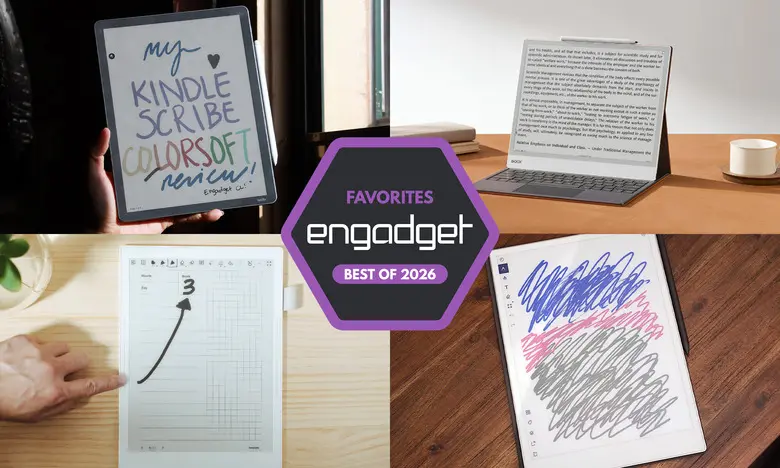
E Ink tablets have evolved from niche gadgets into powerful digital notebooks that appeal to readers, students and professionals. They combine the tactile satisfaction of writing on paper with the convenience of digital storage, cloud syncing and even color displays. After hands-on testing with nearly a dozen models, we have chosen the best E Ink tablets for 2026 across multiple categories and price points.
Best E Ink tablets for 2026
reMarkable 2: Best E Ink tablet for most people
Price: $299 (with Marker) | Screen: 10.3-inch | Battery: Two weeks | Weight: Under one pound | Storage: 8GB | Stylus: Extra cost
The reMarkable 2 is our top pick because it balances a fantastic writing experience, a clean interface and a relatively approachable learning curve. The 10.3-inch monochrome display is surrounded by slim bezels, and the tablet weighs less than a pound, making it comfortable to hold for long reading sessions. Writing feels immediate thanks to low latency, and both the Marker and Marker Plus are tilt- and pressure-sensitive with no charging required.
When it comes to reading, the reMarkable 2 supports PDF and EPUB files. Files can be added through the desktop or mobile companion apps, or by connecting Google Drive, Microsoft OneDrive or Dropbox. There is also a Chrome extension that sends longform articles straight to the tablet for later reading and markup. The optional Connect subscription, priced at $3 per month or $30 per year, unlocks unlimited cloud storage and allows note editing in the companion apps, but local use remains straightforward for those who prefer to keep everything on the device.
Inside the software, users can create notebooks, quick sheets and folders, and choose from eight brush types. Handwriting can be converted to typed text with surprising accuracy. The device avoids complicated menus, so most people will feel comfortable within minutes. At $399 for the tablet with the standard Marker, the reMarkable 2 is not cheap, but it is less expensive than many rivals and delivers a near-paper feel that is hard to match.
- Pros: Excellent writing and reading experience; strong cloud integration; easy to use
- Cons: Stylus costs extra; expensive; unlimited cloud storage requires a subscription
reMarkable Paper Pro: Best premium E Ink tablet
Price: $579 | Screen: 11.8-inch | Battery: Two weeks | Storage: 64GB | Stylus: Extra cost
The reMarkable Paper Pro refines everything that made the reMarkable 2 great. Its larger 11.8-inch display uses a custom Canvas Color E Ink technology that can produce 20,000 colors, enabling colored highlights, annotations and drawings. A faster quad-core processor, 2GB of RAM and 64GB of storage make the interface feel zippy, with reduced page refresh times and a pen latency of just 12 milliseconds.
The tablet keeps the same distraction-free software as the reMarkable 2, with a simple layout for organizing documents and notes. The addition of color is genuinely useful for students, researchers and professionals who want to categorize information visually. A front light also allows comfortable use in dark environments.
At $629, the Paper Pro is a significant investment. The optional Connect subscription adds cloud syncing and note editing in mobile apps, but the large built-in storage may be sufficient for many users. If you want a premium E Ink experience with a big, color display and fast performance, the Paper Pro is the best choice.
- Pros: Color display is a welcome addition; front light; vastly improved performance
- Cons: Expensive
Amazon Kindle Scribe: Best e-reader E Ink tablet
Price: From $430 | Screen: 11-inch | Battery: Months | Storage: Up to 64GB | Stylus: Included
The latest Kindle Scribe improves on an already solid formula with a faster processor, a larger 11-inch front-lit display and a more refined design. The included Premium Pen feels comfortable and attaches magnetically to the tablet. Writing latency is extremely low, and the device responds quickly when navigating menus or flipping pages.
The main advantage of the Scribe is its deep integration with the Kindle ecosystem. Users can highlight, underline and take notes while reading Kindle books, although annotation is more limited than on dedicated note-taking tablets. The new AI Search feature can summarize and provide insights from notebooks, but it works only some of the time, so it may be best for students and researchers who want a supplemental tool.
The Scribe family includes several versions: a $430 model without a front light, a $500 model with an improved front light, and the $630 Scribe Colorsoft with a color display. The Colorsoft is a good option for readers who want a color E Ink screen but still want the convenience of Kindle’s library.
- Pros: Fast performance; low-latency writing; seamless Kindle integration; premium pen included
- Cons: AI Search can be unreliable; marking up Kindle books is inconsistent
Supernote A6 X2: Best E Ink tablet for writing and note-taking
Price: $299 | Screen: 7.8-inch | Battery: Weeks | Storage: 32GB expandable to 2TB | Stylus: Extra cost
The Supernote A6 X2, also called the Nomad, is a compact E Ink tablet made for writers. Its 7.8-inch screen makes it more portable than most rivals, while the FeelWrite 2 screen protector provides a smooth, paper-like surface. The plastic body is light, and dual sidebars make it easy for both left- and right-handed users. The design is user-repairable, with a replaceable battery and a microSD card slot.
Support for many file formats, including PDF, EPUB, Word, PNG and JPG, means you can bring a wide variety of material onto the device. Built-in templates are useful, but more advanced users can import their own planner templates. The Atelier painting app adds a creative outlet, with multiple brushes and grayscale levels, and supports PSD export.
Handwriting recognition is excellent, and the software can turn scribbled words into searchable, typed text. A keywords feature lets you bookmark important phrases and jump back to them quickly. The device is not for everyone; it has a learning curve and a less polished interface than the Kindle or Kobo. But for notebook enthusiasts and journalers, the Supernote offers an unmatched level of customization.
The Nomad costs $329, while the larger Manta A5 X2 costs $505. Pens start at $89. Choose the Nomad for portability or the Manta for more screen space, especially if your handwriting is large or you prefer a bigger canvas.
- Pros: Excellent writing experience; many notebook customization options; good handwriting recognition
- Cons: Pen costs extra; no backlight
Onyx Boox Note Air4 C: Another color-display option
Price: $500 | Screen: 10.3-inch | Battery: Weeks | Storage: 64GB | Stylus: Included
The Onyx Boox Note Air4 C combines a color E Ink display with the flexibility of Android 13. It runs many Android apps from the Google Play Store, including Kindle, Kobo and various note-taking tools. The included stylus works with the tablet’s notebook app, which offers multiple brushes, colored ink and a useful save-brush feature.
Colored highlights and shapes can be added to notes, which is helpful for visual learners. An AI recognition feature accurately converts handwriting to typed text, and notes can be shared via email or cloud services. The device also supports a web browser, but the E Ink screen is not ideal for video or heavy browsing. Still, the Android base makes the Note Air4 C the most versatile option in this roundup.
At $529, the Note Air4 C is on the expensive side, but it includes a stylus and folio case. For readers and writers who want access to a broad range of apps and services, this is a strong contender.
- Pros: Color display; Android 13 with Google Play; many file transfer options; stylus included
- Cons: Not great for video; not as user-friendly; expensive
Onyx Boox Note Max: A big-screen option
Price: $650 | Screen: 13.3-inch | Battery: Weeks | Storage: 128GB | Stylus: Included
The Boox Note Max is a large-format E Ink tablet with a 13.3-inch Carta 1300 display. It is designed for those who want an A4-sized canvas for reading, writing and sketching. The display is sharp and roomy, and the native Calendar Memo app lets you attach notes to individual days, creating a useful long-term diary and planner.
Because it runs Android 13, you can install apps, though the large E Ink screen is best for productivity rather than entertainment. The Note Max includes a stylus and cover, which adds value at $689. The lack of a front light and a somewhat tinker-friendly interface may not suit everyone, but for a spacious digital notebook, the Note Max is impressive.
- Pros: Sharp large display; Android 13; stylus and cover included
- Cons: No front light; not as user-friendly; expensive
reMarkable Paper Pro Move: Honorable mention
Price: $449 | Screen: 7.3-inch | Battery: Two weeks | Storage: 64GB | Stylus: Included
The Paper Pro Move packs the reMarkable experience into a smaller and more portable body. Its 7.3-inch Canvas Color display is comfortable for note-taking on the go, and the hardware quality matches the larger Paper Pro. The included marker charges magnetically, and the device runs the same distraction-free software.
At $449, it is more affordable than the full-sized Paper Pro, though still pricey for a compact tablet. There is no keyboard folio option, so typing is limited to the on-screen keyboard. If you want a color E Ink writing slate that fits in a bag or pocket, the Paper Pro Move is one to consider.
- Pros: Compact; excellent build quality; good battery life
- Cons: Expensive for the size; no keyboard folio
Kobo Libra Colour: Honorable mention
Price: $219 | Screen: 7-inch | Battery: Up to 40 days | Storage: 32GB | Stylus: Extra cost
The Kobo Libra Colour is a seven-inch color E Ink ereader that also supports stylus input. It allows you to highlight text, write in margins and create notebooks. With a responsive stylus, Dropbox and Google Drive integration, and a crisp front-lit display, it is a surprisingly effective E Ink tablet for people who want to read and annotate a variety of ebooks.
The device does not include a stylus; the Kobo Stylus costs $70 extra. Even so, total cost is well below the more expensive Kindle Scribe. If you do not need a huge screen or access to Kindle’s massive library, the Libra Colour is a smart, affordable alternative.
- Pros: Color display; low-latency stylus; can write in the margins of any ebook
- Cons: Smaller screen; stylus costs extra
Are E Ink tablets worth it?
E Ink tablets are a worthwhile purchase for a specific audience. They are ideal for people who prefer a paper-like writing experience or want a distraction-free device. Because most E Ink tablets do not run full operating systems, they limit casual browsing and social media, which is a benefit for many users.
Compared with an iPad, an E Ink tablet lacks vibrant colors, fast refresh rates and video performance. But if email and internet browsing tempt you away from work, the simplicity of E Ink can help you focus. The most important question is whether the use case fits your workflow.
What to look for in an E Ink tablet
Writing and latency
The writing experience depends on display refresh rates and stylus latency. Most current models have very low latency, but some feel more natural than others. Check whether the stylus is included; many devices require an extra purchase.
Reading
Consider screen size and supported file formats. Larger screens are better for writing but may be less comfortable for long reading sessions. If you buy ebooks from Amazon or Kobo, choose a tablet from that company, or a device that supports the relevant apps, to avoid DRM issues.
Search functionality
Some tablets store notes and annotations inline, making it easy to refer back. Others support handwriting recognition and text search. Decide how important it is to search through your notes before buying.
Sharing and connectivity
Most E Ink tablets support Wi-Fi, and many offer cloud syncing or companion apps. None integrate directly with Evernote or OneNote, so they serve as supplements to existing digital note systems. If you rely heavily on cloud notes, a standard tablet with a stylus may be a better fit.
Price
E Ink tablets typically range from $300 to $800. Size and stylus support are major price factors. Recently, several brands including reMarkable, Supernote and Onyx Boox have increased prices due to higher component and operational costs.
Other E Ink tablets we have tested
Onyx Boox Tab X C
The Tab X C is a 13.3-inch color E Ink Android tablet with an octa-core processor and 6GB of RAM. It is powerful and elegant, but at $820 or more, it is too expensive for most people.
Lenovo Smart Paper
Lenovo’s Smart Paper has solid hardware, but its software is less flexible and it relies heavily on Lenovo’s cloud service. The subscription fees make it less attractive than competitors.
Onyx Boox Tab Ultra
The Tab Ultra runs Android 11 and works with a magnetic keyboard, turning it into a low-powered 2-in-1. It can browse the web and stream video, but standard laptops or tablets are better for those tasks. It is best for reading and eye comfort above all else.
Source: Engadget News